Alternatives · Solar Fire

A modern Solar Fire alternative for Windows

Solar Fire has been the Windows standard for decades — and it earned that place. But if you want the same Swiss-Ephemeris precision in a cleaner, modern interface, with sidereal and Vedic work built in and a price that doesn't ask for a leap of faith, AstroWatch is built for you. Free to try, one-time Pro licence, no subscription.

Solar Fire vs AstroWatch

An honest, side-by-side look

Solar Fire is a deep, mature package. Here is where each tool is strongest, so you can choose with clear eyes.

 
Solar Fire
AstroWatch
PlatformWhere it runs
Windows only
Windows now · Mac, iOS & Android in development
Ephemeris sourceThe astronomy behind the numbers
Swiss Ephemeris
Swiss Ephemeris 2.10
House systems
30
28 + high-latitude fallback
Sidereal & Vedic suiteNakshatras · dasha · vargas · doshas
Limited / separate
Full suite, 8 ayanamsas
Visual timing engineOrb-curve graph + exact-hit grid
Tables & reports
Graph + grid + CSV
InterfaceLook & feel
Classic, dense
Modern, high-DPI SkiaSharp
Legacy technique libraryHarmonics · midpoint trees · decades of depth
Very extensive
Focused & growing
Free tier to try
Demo only
Free forever, no account
PricingHow you pay
Premium one-time licence
Free + one-time Pro (launch $128.99)
Why practitioners switch

The timing tools you actually watch the sky with

AstroWatch's Aspect Calendar plots every contact across your chosen span as smooth orb-curves — colour intensity reads as closeness — then hands you the exact hits in a sortable grid. Transit-to-transit, transit-to-natal, or progressed-to-natal, exportable to CSV.

  • Tropical & Sidereal in one app — 8 ayanamsas including Lahiri, KP, Fagan/Bradley and Raman.
  • 28 house systems with automatic high-latitude fallback beyond ±66°.
  • Print-ready reports in Classic or Parchment styles — A4 or Letter, straight to PDF.
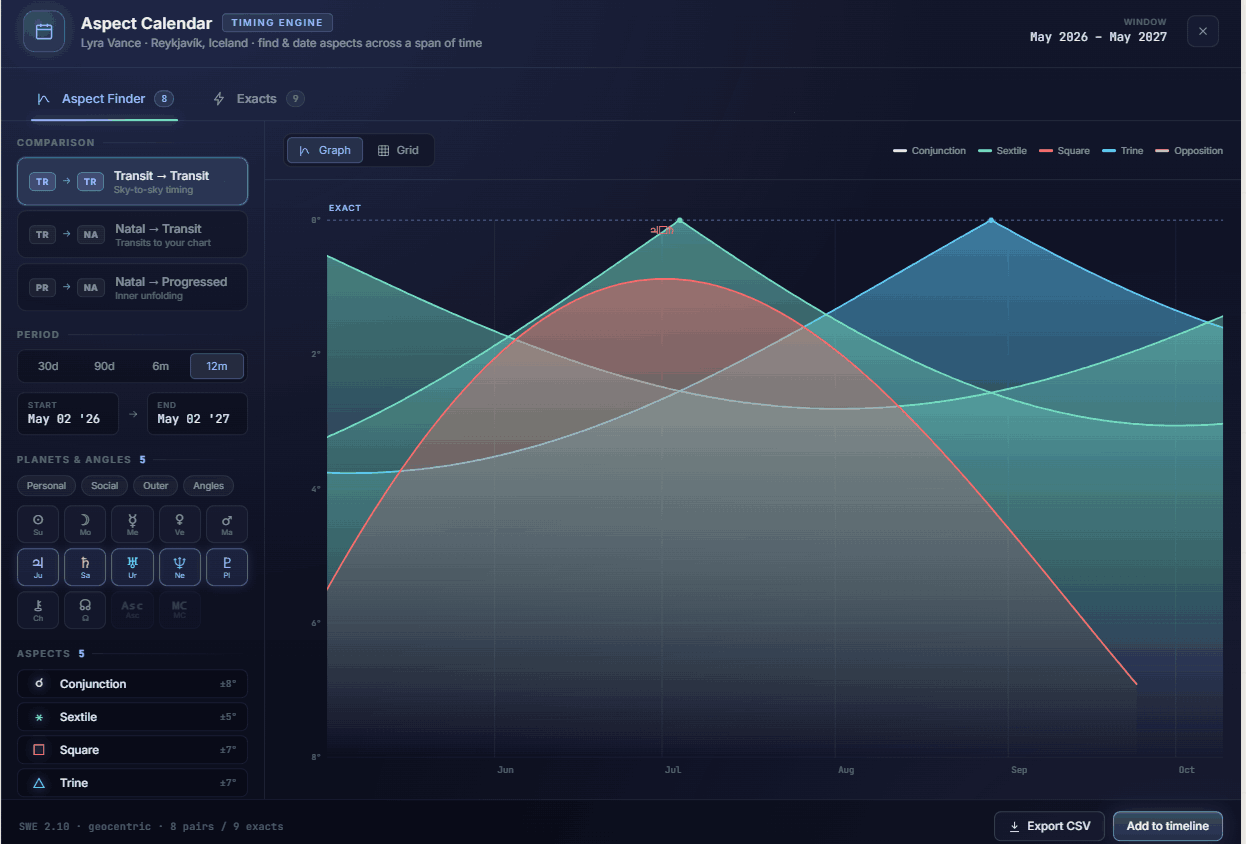
AstroWatch Aspect Calendar timing engine with orb-curve graph — a Solar Fire alternative for Windows
The whole practice

Everything the craft demands

Natal & radix charts

Configurable orbs, aspect sets and a live aspect list sorted by tightness.

Transits & forecasting

Track the moving sky against any chart with exact-hit dates and timelines.

Synastry & multi-wheel

Bi-, tri- and quad-wheel overlays with a full cross-layer aspect grid.

Full Vedic suite

Nakshatras, dashas, vargas, ashtakavarga, doshas and planetary hours.

Solar & lunar returns

Cast precise returns for any location and year, dropped onto the wheel as a layer.

70+ page reports

Book-length written natal reports in warm, plain language — print-ready to PDF.

Try it free

See it on your own charts

Install free from the Microsoft Store and cast a chart in minutes. Unlock the full engine with a one-time Pro licence whenever you're ready.

Get it on Microsoft Store Compare all features
Questions

Good to know

Yes, if you want a modern Windows chart engine at a lower price with sidereal and Vedic work built in. AstroWatch computes every chart with the Swiss Ephemeris 2.10, offers 28 house systems, both tropical and sidereal zodiacs, a visual Aspect Calendar timing engine and print-ready PDF reports. Solar Fire has a longer track record and a larger library of legacy techniques; AstroWatch focuses on a clean modern interface, integrated Western and Vedic practice, and a free tier so you can try before buying.

Yes. AstroWatch is a native Windows 11 and Windows 10 (64-bit) desktop application installed from the Microsoft Store. macOS, iOS and Android editions are in development.

AstroWatch is free to install and cast charts. The Pro licence is a one-time purchase of $128.99 (launch price) that unlocks the full engine, with free lifetime updates — well below the price of a traditional Solar Fire licence.

Yes. AstroWatch includes a full Vedic and sidereal suite — nakshatras, dashas, vargas, ashtakavarga, doshas and planetary hours — with eight ayanamsas including Lahiri, KP and Fagan/Bradley, all built into the same application as the Western toolkit.