AstroWatch reads your days for you. The Today card on the dashboard sums up the day in plain words, and the Forecast screen opens it up into weeks, months, a whole year and your long life cycles — each rated Lucky, Easy or Challenging, with the key moments on a timeline and a written summary of what they bring.

The Today card on the Western dashboard.
The Today card
The Today card sits in the right-hand column of the Western dashboard (it's the default there; you can switch it on or off in Customize Dashboard). From top to bottom it shows:
- The day's tone — Lucky, Easy or Challenging, with a mixed day shown in lavender.
- Moon of the day — its sign, phase and how much of it is lit, when it goes void of course and when it enters the next sign.
- Message of the day — one plain-language sentence for the day.
- For you — the transits touching the open profile's birth chart, tagged Exact today, Building or Fading. Hover a row for the technical detail (planets, aspect, orb, house); click it to show that moment on the chart.
- In the sky this week — sign changes, planets turning retrograde or direct, and New and Full Moons.
A blinking LIVE dot means the card reads the present moment. Move the dashboard's time slider and the card follows it, marked Previewing a date · not today, with a Back to today link. Open full forecast at the bottom opens the Forecast screen.
Opening the Forecast screen
- Click Open full forecast on the Today card, or
- choose View → Forecast and pick a period: Today, This Week, This Month, This Year or Current Cycles.
The screen fills the window like the Expanded Chart View. Dashboard at the top left (or Esc) takes you back.

The Forecast screen — period tabs, key moments on a timeline, and the written summary.
Personal and World
The Personal | World switch at the top chooses whose forecast you read:
- Personal — the open profile: transits, returns and progressions to the birth chart. It needs a profile; Open profile… lets you pick one.
- World — the sky for everyone: New and Full Moons, eclipses, stations, sign changes and the planets' contacts with each other, read by the rules of mundane astrology. No profile needed.
The periods
| Period | What it reads |
|---|---|
| Today | Transits and the Moon. The day runs from sunrise to the next sunrise at your location. |
| This Week | Transits and the Lunar Return, with a tone for each day. |
| This Month | Transits and the Lunar Return, with up to twelve key moments and a tone for each day. |
| This Year | Your Solar Return year (birthday to birthday), the slow-planet transits and your progressions, with a tone for each month. |
| Current Cycles | Your long progressions and the Saturn, Jupiter and Node cycles — where you stand in each one today. |
The arrows beside the period's dates step to the previous or next day, week, month or year.
Techniques
The Technique choice narrows a reading to one method: All (the default), Transits, Lunar Return, Solar Return or Progressions. A technique that a period doesn't use says so — the Lunar Return is read for This Week and This Month, the Solar Return for This Year, and progressions for This Year and Current Cycles. Returns and progressions need a profile.
Reading a forecast
- Key moments — the period's notable moments, each drawn as a small chart on a timeline. A quiet stretch is noted as such: a good time for routine work and rest.
- The summary — the overall tone, a headline, the life areas In focus (Self, Money, Home, Relationships, Career and so on) and a few short sections in plain words.
- The side panels — the Moon, the tone by day (or by month for a year), and What's shaping this: the influences behind the reading. Hover a glyph for its meaning in words. In a week or a month, click a day to open it; in a year, click a month.
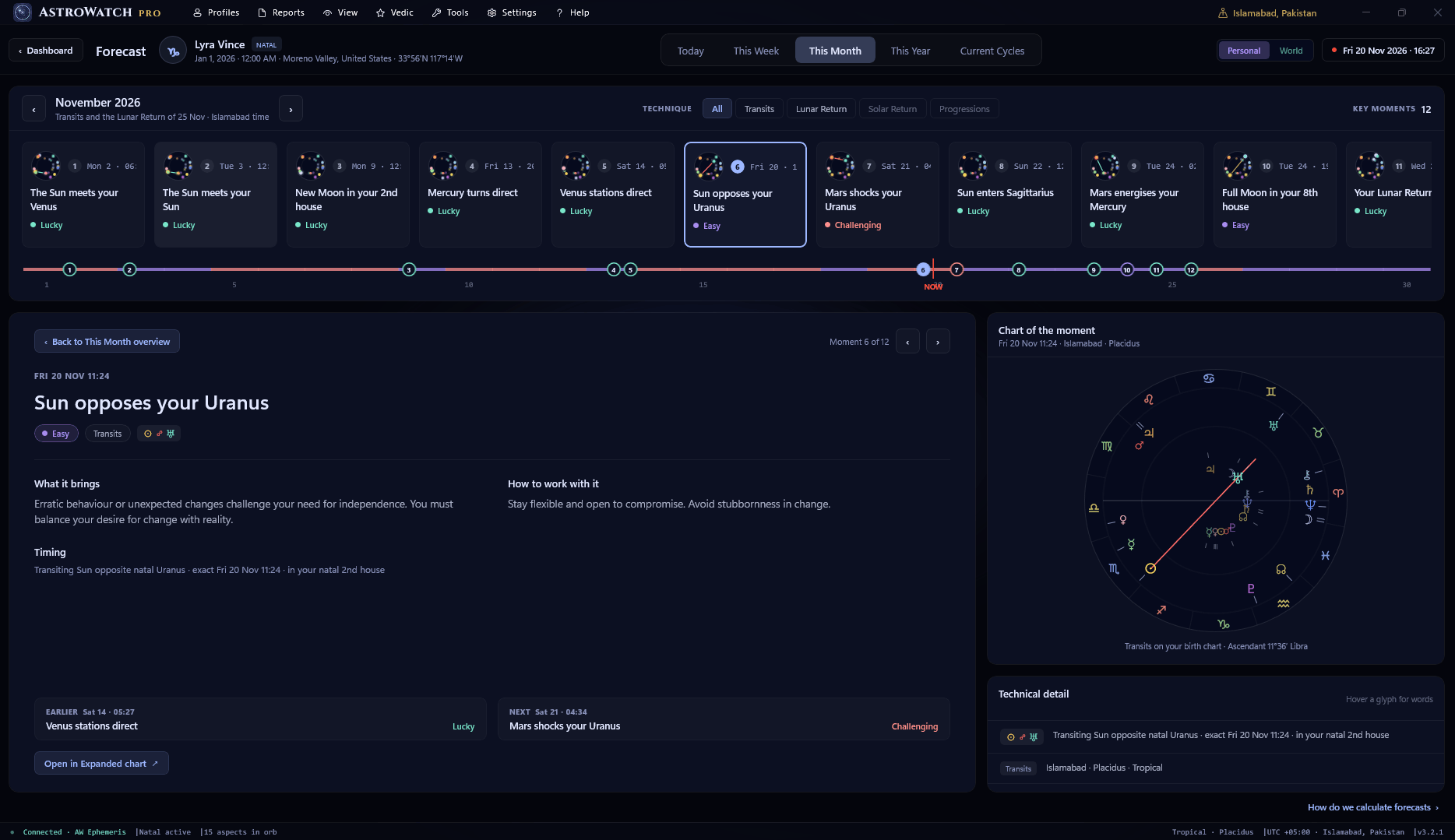
A key moment: what it brings, how to work with it, and its chart.
A key moment
Click a key moment to open it: What it brings, How to work with it, Timing and the Chart of the moment. Earlier and Next step through the period's moments, Technical detail shows the exact astronomy, and Open in Expanded chart shows that moment's transit chart in the Expanded Chart View.
Current Cycles
Your long cycles shows how far round each slow cycle has come since your birth — the progressed Moon, Saturn, Jupiter and the Lunar Nodes — with its phase (New cycle, Growing, Full or Closing) and the date of its next return.
Editions
| Free & Extended | Pro | |
|---|---|---|
| Today card | ✓ | ✓ |
| Forecast screen · Today (Personal and World) | ✓ | ✓ |
| This Week, This Month, This Year, Current Cycles | — | ✓ |
| Lunar Return, Solar Return and progressions in forecasts | — | ✓ |
On Free and Extended the longer periods carry the Pro crown; clicking one opens the upgrade panel. The 7-day free trial unlocks them all.
What's next
Want a nudge on the morning of an important transit, even with AstroWatch closed? See Transit Notifications →